On this page
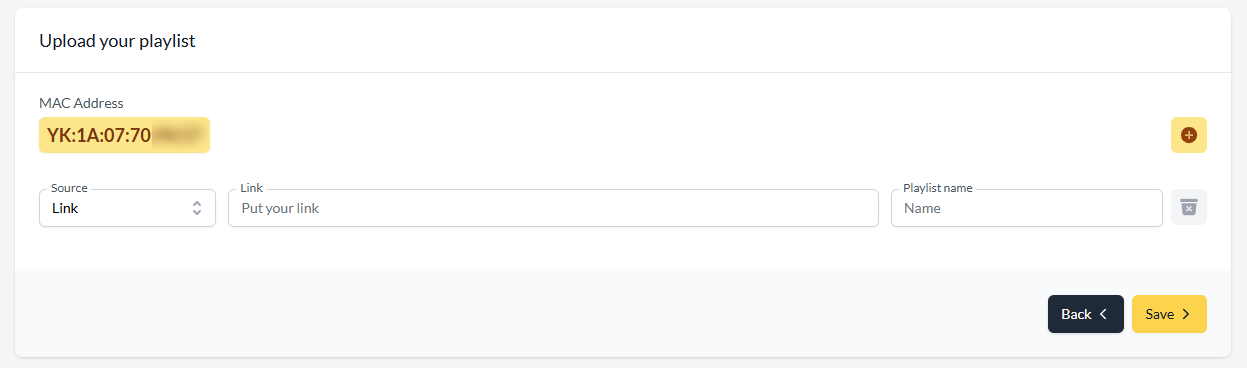
To activate Hot Player (called Hot IPTV on Samsung, LG and VIDAA), open hotplayer.app/upload on your phone or computer, enter the MAC address shown in the app, keep Source on Link, paste your M3U link and press Save. Then restart the app on your TV — your channels appear.
The whole thing takes about two minutes. Do it on your phone or computer: typing a long link with a TV remote is where most people get stuck.
Before you start
- Hot Player is installed on your device. Not yet? Follow the guide for your TV: Firestick, Samsung, LG, Hisense VIDAA, Android TV, Roku, Apple TV or Windows.
- You have your M3U link. It is in the email you received with your subscription or free test, and always on your account page under Subscriptions.
Step 1: Find the MAC address in Hot Player
Open Hot Player on your TV. The first screen shows a MAC address — six pairs of letters and numbers separated by colons. Take a photo of it.
Step 2: Open hotplayer.app/upload
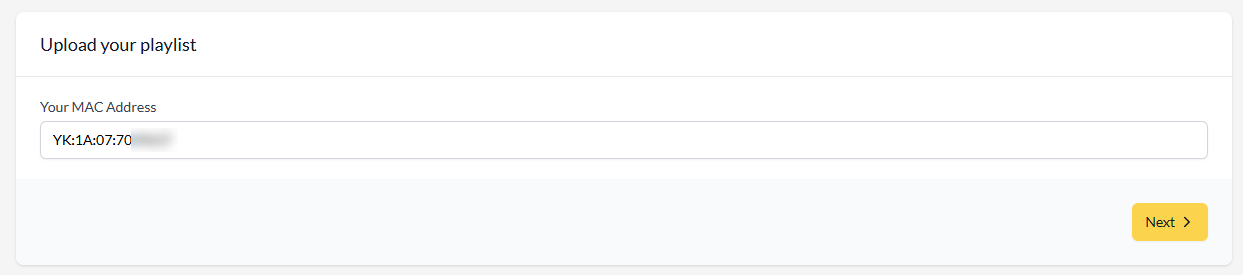
On your phone or computer, open a browser and go to hotplayer.app/upload.
Step 3: Enter the MAC address
Type the MAC address exactly as shown in the app, then select Next.
Step 4: Paste your M3U link
- Leave Source set to Link.
- Paste your M3U link into the URL field.
- Give the playlist any name (for example POKTV).
- Select Save.
Step 5: Restart Hot Player
Close the app on your TV completely and open it again. Your live channels, movies and series load — usually within a few seconds.
Ready to watch?
Try every channel free for 24 hours. No payment, no commitment.
Hot Player licence
Hot Player is a paid app, licensed per device through that MAC address. If you have our 12-month plan, one licence is included free for a year; with the 24-month or Lifetime plan, one licence is included free for life. Request it on the Applications page (a screenshot of the MAC address screen helps) and our team activates it within 24 hours.
Troubleshooting
"Invalid MAC address"
Check every character — 0 (zero) and O (letter), 1 and l are easy to mix up. Include the colons, and make sure you copied the MAC from inside Hot Player, not from the TV settings.
Saved, but the app still shows no channels
Fully close Hot Player on the TV (on Fire TV and Android TV, use Settings › Applications › Force stop; on other TVs, turn the TV off and on) and open it again.
"Playlist error" or "Failed to load"
The M3U link was not pasted in full or contains a typo — copy it again from your email or account page. If it is correct, check that your subscription has not expired on your account page; renewing keeps the same link, so nothing needs to be changed in the app.
I changed TV — do I redo this?
Yes. Each installation of Hot Player has its own MAC address, so link your playlist to the new one. The licence is per device too.
FAQ
Is hotplayer.app/upload the official site?
Yes, it is Hot Player's own activation page.
Do I have to do this again when I renew?
No. Renewing or extending keeps the same line and the same M3U link, so the playlist in Hot Player keeps working — restart the app after the renewal is applied.
Hot IPTV or Hot Player — which one do I have?
They are the same app. It is listed as Hot IPTV on Samsung, LG and VIDAA, and as Hot Player elsewhere. Activation is identical.
Comparing players? Read Hot Player vs IBO Player.
Prefer to click through it?
The interactive installation guide shows the exact steps for your device and player.
Open the installation guide →