On this page
To watch IPTV on a Samsung Smart TV, install an IPTV player from the Samsung Apps store — search for Hot IPTV or IBO Player — then link it to your subscription from your phone by entering the MAC address the app shows. The whole setup takes about 10 minutes and needs no extra box.
Samsung TVs run Tizen, not Android. That means there is no Google Play Store, no Downloader app and no sideloading: everything comes from Samsung's own store, which makes it one of the easiest TVs to set up.
What you need
- A Samsung Smart TV connected to the internet (any recent Tizen model)
- An IPTV subscription — or a free 24-hour test, no card needed
- Your M3U link from the delivery email (also on your account page under Subscriptions)
- A phone or computer to add the playlist
- At least 15 Mbps for HD, 30 Mbps for 4K — a network cable is steadier than Wi-Fi
Which player to install on a Samsung TV
| Player | Search Samsung Apps for | Developer to check |
|---|---|---|
| Hot Player | Hot IPTV | STE DIGI VIBES |
| IBO Player | IBO Player | — |
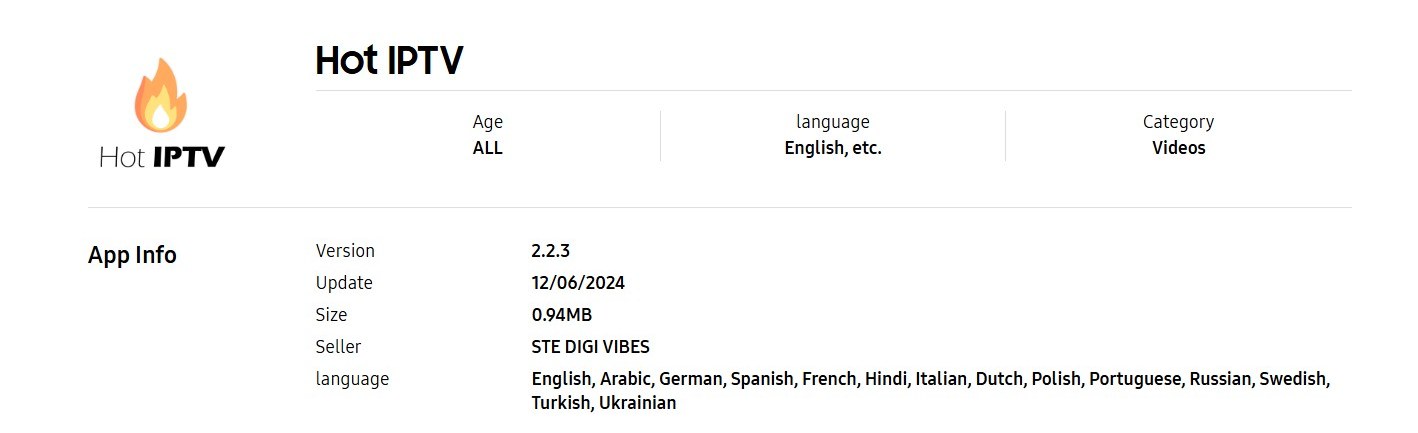
On Samsung, Hot Player is published under the name Hot IPTV. That is the same app — search for "Hot IPTV", not "Hot Player". Both players work with the same subscription; see Hot Player vs IBO Player if you cannot decide. We recommend Hot Player for the quickest setup.
Step 1: Open Samsung Apps
Press the Home button on your remote and open Apps (the four-square icon on the home bar). This is the Samsung Apps store.
Step 2: Search for the player
Select the search icon (magnifying glass) at the top right and type Hot IPTV (or IBO Player).
Step 3: Check the developer before installing
Store searches show look-alike apps with similar names and icons. Open the listing and check the developer:
- Hot IPTV must be published by STE DIGI VIBES, character for character.
If the developer is different, go back — it is not the app this guide covers and our support team cannot help with it.
Step 4: Install and open the app
Select Install, wait for it to finish, then select Open. To keep it handy, choose Add to Home so it appears on the home bar.
Step 5: Write down the MAC address
On first launch the app shows the code it needs to be linked to your subscription:
- Hot IPTV shows a MAC address.
- IBO Player shows a MAC address and a device key.
Take a photo of the screen. This is the app's MAC address — not the one in your TV's network settings. Mixing the two up is the number-one reason activation fails.
Ready to watch?
Try every channel free for 24 hours. No payment, no commitment.
Step 6: Add your subscription from your phone
Do this on your phone or computer — typing a long link with a TV remote is where most people get stuck.
- Hot IPTV: open
hotplayer.app/upload, enter the MAC address, leave Source on Link, paste your M3U link and press Save. Step-by-step: How to activate Hot Player. - IBO Player: open
iboplayer.com/device/activate, enter the MAC address and device key, open Add Playlist and paste your M3U link. Step-by-step: How to activate IBO Player.
Close the app on the TV and open it again. Your live channels, movies and series appear.
Hot Player and IBO Player are paid apps, licensed per TV. The licence is included free with our 12-month, 24-month and Lifetime plans — request it on the Applications page and our team activates it within 24 hours.
Troubleshooting
I can't find Hot IPTV in Samsung Apps
Check the spelling ("Hot IPTV", with a space) and that your TV is signed in to a Samsung account in the right country. Some older Samsung models do not list it; in that case a Fire TV Stick plugged into the TV is the simplest fix.
The app opens but shows no channels
The playlist has not been linked yet, or the app was not restarted after linking. Re-check the MAC address you typed on the website (no spaces, colons included), save again, then fully close and reopen the app.
"Login failed" or "playlist error"
Paste the M3U link exactly as it is in your email — it is case-sensitive. If it still fails, check on your account page that your subscription has not expired.
The picture freezes or buffers
Restart the router and the TV, use a network cable if you can, and make sure no one else is streaming on the same line at the same time. See IPTV buffering: what actually works.
FAQ
Can I install IPTV on a Samsung TV without an app?
No. A Samsung TV needs an IPTV player app to play the channels. Hot IPTV and IBO Player both come from the official Samsung Apps store, so nothing needs to be sideloaded.
Can I use Downloader on a Samsung TV?
No. Downloader only exists on Android-based devices (Android TV, Google TV, Fire TV). On Samsung, the player comes from Samsung Apps.
Which is better on Samsung, Hot IPTV or IBO Player?
Hot IPTV is lighter and the quickest to set up; IBO Player is the better-known app that also runs on almost every other device. Both play the same channels. Full comparison: Hot Player vs IBO Player.
Does IPTV work on Samsung in 4K?
Yes, on a 4K Samsung TV with at least 30 Mbps. Channels and films are delivered in 4K where the source provides it.
Can I watch on my Samsung TV and my phone at the same time?
A subscription includes one connection, so one stream at a time. You can install the app on both and switch between them, but watching on two screens at once needs a second subscription.
Want the clickable version? The installation guide for Samsung walks you through the same steps.
Prefer to click through it?
The interactive installation guide shows the exact steps for your device and player.
Open the installation guide →