On this page
- What you need
- Which player for which computer?
- Windows: Hot Player from the Microsoft Store
- Windows or Mac: IBO Player
- Troubleshooting
- The player shows no channels after activation
- Video stutters on Wi-Fi
- Can I just open the M3U link in VLC?
- FAQ
- Is there Hot Player for Mac?
- Do I need a powerful computer?
- Can I watch on the computer and the TV at the same time?
To watch IPTV on a computer, install a player app and link your subscription to it. On Windows, use Hot Player from the Microsoft Store or the IBO Player desktop app; on a Mac, use IBO Player (Hot Player has no Mac version). Setup takes about 5 minutes.
What you need
- A Windows PC/laptop or a Mac
- An IPTV subscription — or a free 24-hour test, no card needed
- Your M3U link (in your delivery email and on your account page under Subscriptions)
- At least 15 Mbps for HD, 30 Mbps for 4K
Which player for which computer?
| Computer | Hot Player | IBO Player |
|---|---|---|
| Windows | Microsoft Store | iboplayer.com/downloads |
| Mac | Not available | iboplayer.com/downloads |
Windows: Hot Player from the Microsoft Store
- Open the Microsoft Store (Start menu › Microsoft Store).
- Search for Hot Player, select Get / Install, then open it.
- The app shows a MAC address on its first screen — copy it.
- In your browser, open
hotplayer.app/upload, paste the MAC address, keep Source on Link, paste your M3U link and select Save. Full guide: How to activate Hot Player. - Close Hot Player and open it again. Your channels load.
Windows or Mac: IBO Player
- Open
iboplayer.com/downloadsand download the version for your computer (Windows or macOS). - Install the program and open it.
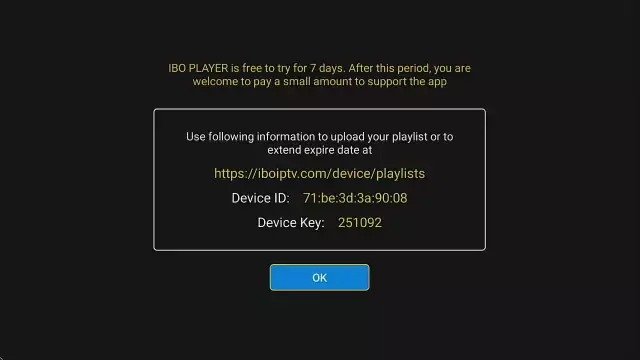
- Copy the MAC address and device key shown on the first screen.
- Open
iboplayer.com/device/activate, enter both, complete the captcha and select LOGIN. - Choose Add Playlist, paste your M3U link into Playlist URL and Save. Full guide: How to activate IBO Player.
- Restart IBO Player — your channels, movies and series appear.
Ready to watch?
Try every channel free for 24 hours. No payment, no commitment.
Hot Player and IBO Player are paid apps licensed per device. A licence is included free with our 12-month, 24-month and Lifetime plans — request it on the Applications page and our team activates it within 24 hours.
Troubleshooting
The player shows no channels after activation
Make sure the playlist was saved against the MAC address shown in the app (not your computer's network address), then fully quit and reopen the player.
Video stutters on Wi-Fi
Plug the computer into the router with a cable if you can, close downloads and other streams, and check nobody else watches on the same line. More: IPTV buffering: what actually works.
Can I just open the M3U link in VLC?
Many people do, and it plays — but VLC has no TV guide, no movie and series library and no favourites. A dedicated player is far more comfortable for everyday use.
FAQ
Is there Hot Player for Mac?
No. Hot Player has no macOS version; use IBO Player on a Mac.
Do I need a powerful computer?
No. Any computer from the last several years plays HD smoothly. 4K needs a 4K screen and at least 30 Mbps.
Can I watch on the computer and the TV at the same time?
One subscription includes one connection — one stream at a time. A second screen at the same time needs a second subscription.
Prefer clicking? Use the installation guide for Windows or Mac.
Prefer to click through it?
The interactive installation guide shows the exact steps for your device and player.
Open the installation guide →