On this page
For IPTV, the MAC address is the code your player app shows on its first screen — six pairs of letters and numbers like a1:b2:c3:d4:e5:f6. You enter it on the player's website to link your playlist and licence to that device. It is the code inside the app, not the MAC address in your TV's network settings and not your router's.
Mixing these up is the single most common reason IPTV activation fails, so this short guide is worth two minutes.
Why IPTV players use a MAC address
Players like Hot Player and IBO Player are set up from your phone or computer, not with the TV remote. The MAC address tells the player's website which device to send your playlist to. It also identifies the device for the player licence, which is why a licence is per device.
Players that need one:
| Player | What it shows | Where you enter it |
|---|---|---|
| Hot Player / Hot IPTV | MAC address | hotplayer.app/upload |
| IBO Player | MAC address + device key | iboplayer.com/device/activate |
| MYTVOnline+ | Nothing — no MAC needed | — |
| MAG box | MAC printed under the box | Sent to our support if needed |
Where to find it in each player
Hot Player (Hot IPTV)
Open the app. The MAC address is shown on the first screen until a playlist is linked. Take a photo of it. → How to activate Hot Player
IBO Player
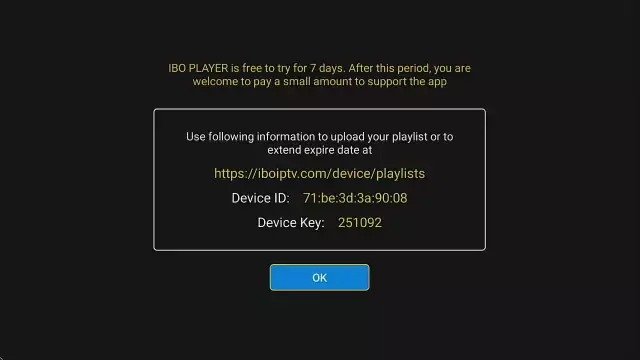
Open the app. The first screen shows the MAC address and the device key. You need both to log in on the activation page.
MYTVOnline+
There is no MAC address — you paste your M3U link directly in the app. That is why it is the easiest option on phones and tablets.
MAG box
A MAG box uses no player app. Its MAC address is printed on the label under the box and starts with 00:1A:79. If your portal does not load, send us that address and we activate it for you.
Ready to watch?
Try every channel free for 24 hours. No payment, no commitment.
The three MAC addresses people confuse
- The app's MAC address — shown inside Hot Player or IBO Player. ✅ This is the one you need.
- Your TV's network MAC address — in the TV's network or "About" settings. ❌ Not this one.
- Your router's MAC address — on the router label. ❌ Not this one either.
The app may display a code that looks completely different from your TV's network address. That is normal: the app has its own.
What is the IBO Player device key?
A second code shown next to the MAC address in IBO Player. It works like a password for that device: the activation page asks for both, so nobody can change your playlist with the MAC address alone.
Typing it correctly
- Copy every character, including the colons.
- Watch for look-alikes:
0(zero) vsO,1vsl,8vsB. - A photo of the screen is the easiest way to avoid mistakes. When you request a player licence on the Applications page, attach that photo — it prevents most failed activations.
When does the MAC address change?
- On a new device — every TV, stick or phone has its own.
- Sometimes after reinstalling the app or resetting the device.
If it changes, link your playlist to the new MAC address again. The licence is per device too.
FAQ
Can I use my TV's MAC address instead?
No. The player's website only recognises the MAC address the app itself displays.
Is it safe to share my MAC address?
With our support team, yes — it is how we help with activations. Keep the IBO device key private, as together they allow changes to your playlist.
I can't see the MAC address — the app goes straight to channels
A playlist is already linked. Look in the app's settings or "About" screen; most players show the MAC address there too.
Do I need a MAC address for the free test?
Only if you use Hot Player or IBO Player. With MYTVOnline+ on a phone, you can start your free 24-hour test with just the M3U link.
Something else not working? Run through the IPTV not working checklist.