Installation Guide


On this device we use Hot Player: it is published in the official store, so there is nothing to sideload. IBO Player is not available here.
Install the app on your device
- 1
Turn on your device and open VIDAA App Store.
- 2
Search for Hot IPTV.
- 3
Before you install, check that the developer is STE DIGI VIBES.
- 4
Select Install, wait until it finishes, then open the app.
- 5
The app shows a MAC address on the screen. Write it down — you need it in Phase 2.
Add your subscription to the app
- 1
On your phone or computer, open hotplayer.app/upload in a browser.
- 2
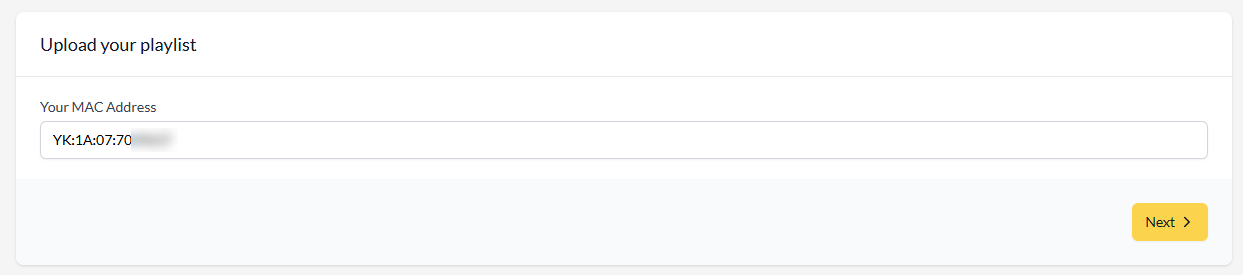
Type the MAC address shown in the app on your device, then select Next.
- 3
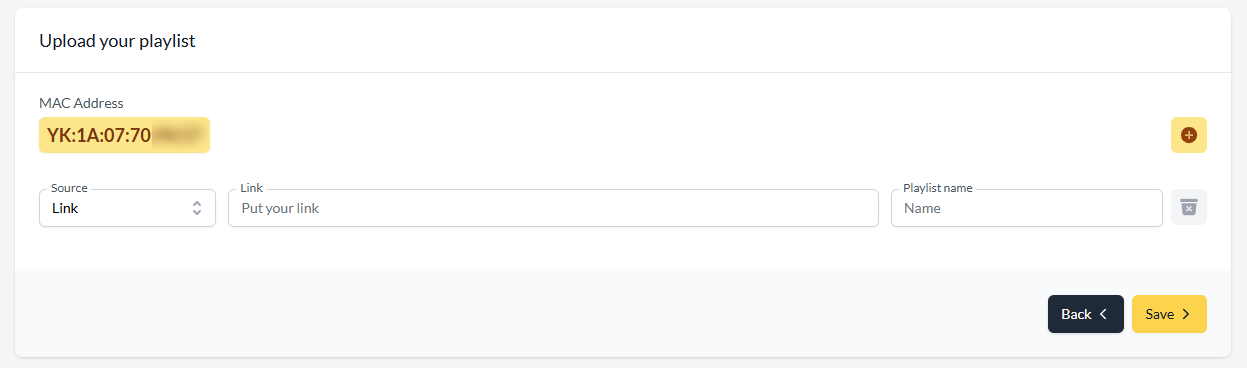
Leave Source on Link, paste the M3U link we sent you by email, give the playlist any name, then select Save.
- 4
Close the app on your device and open it again — your channels, movies and series appear.
Want more detail?
Our full guide covers this setup with tips and fixes for common problems.
Need a hand?
Send us the MAC address (and device key) shown on your screen and we set everything up for you.